On this page 9 sections
- Write the action down properly first
- Five follow-up emails for project work
- When an approval needs several people
- When the same person always misses deadlines
- Two templates for client projects
- How often to chase
- What project and process training says about chasing
- Reminders or automatic follow-ups?
- Letting the reminders send themselves
A lot of a project manager's week goes on follow-up. Somebody owes you an estimate, the sponsor hasn't approved the change request, and the supplier said "early next week" eight days ago. Nobody is refusing. They have their own priorities, and your email from Tuesday is sitting under forty newer ones.
This article covers how to follow up on actions, approvals and sign-offs without becoming the person everyone avoids in the corridor, with five emails you can adapt. Towards the end there's a section on how project management and process improvement frameworks deal with the same problem.
Write the action down properly first
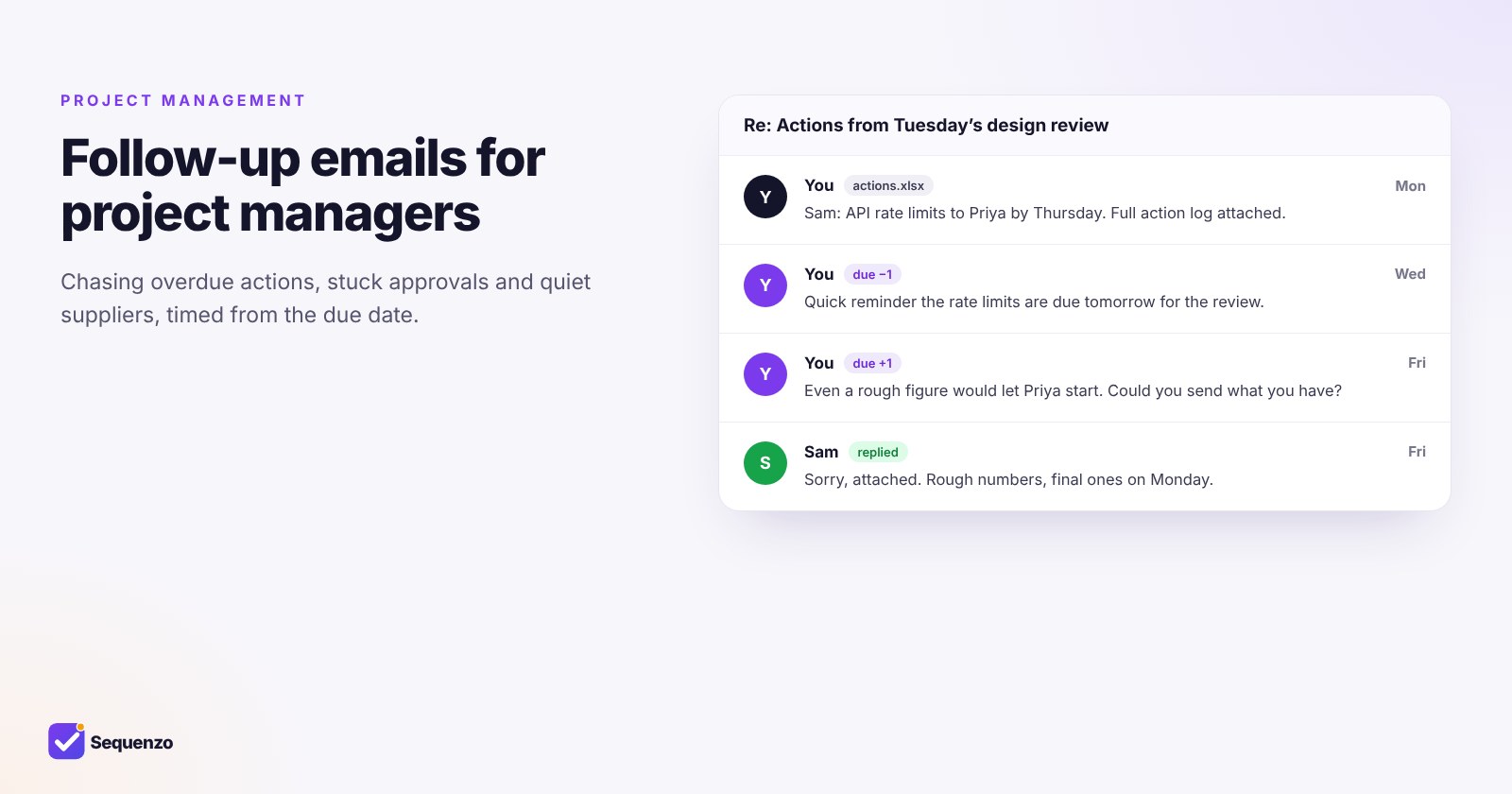
Most follow-up trouble starts in the meeting. "Sam will look into the API limits" isn't something anyone can be chased on. "Sam sends the API rate limits to Priya by Thursday" is, because it has an owner, an output and a date. If your action log is written that way, the follow-up email almost writes itself, and nobody is surprised to get it.
Send the recap the same day, as a reply to the meeting invite or agenda, so everything stays in one thread. Our guide to the follow-up email after a meeting has a simple structure for it.
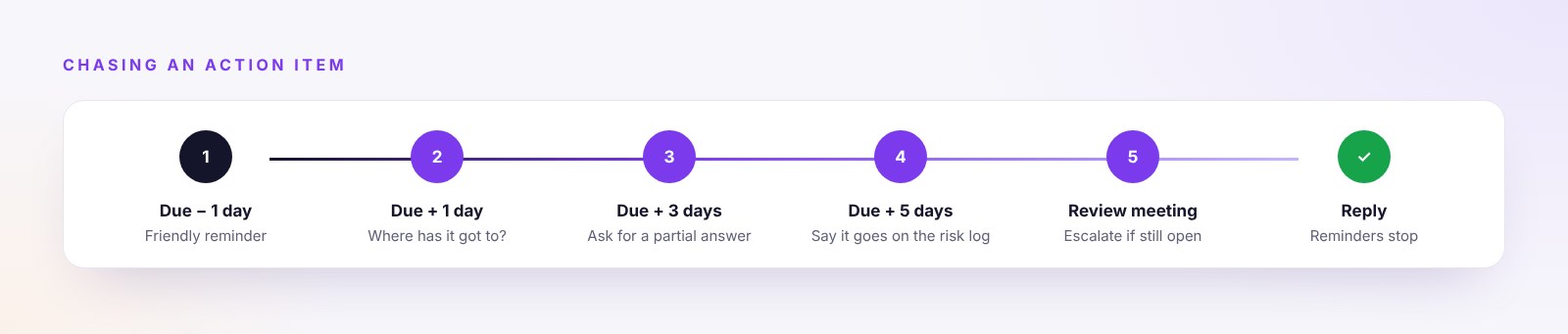
Five follow-up emails for project work
1. The day before it's due
"Hi Sam, a quick reminder that the API rate limits are due tomorrow for Thursday's design review. If anything is in the way, tell me today and I'll move the item on the agenda."
2. The day after it slipped
"Hi Sam, I didn't see the rate limits come through yesterday, so I wanted to check where they've got to. Even a rough figure would let Priya start on the design. Could you send what you have by lunchtime tomorrow?"
Asking for a partial answer gives the person something they can send today, which is easier than finishing the whole job.
3. An approval that's stuck
"Hi Dana, change request 14 (the extra reporting screen) is waiting for your approval. It adds four days to the schedule and nothing to the budget. I can take you through it in ten minutes before Friday's steering meeting, or a yes or no by email is fine."
Put the decision and its impact in the email itself. A sponsor reading on their phone shouldn't have to open the change log to work out what they're approving.
4. A supplier who has gone quiet
"Hi Marco, you mentioned the revised delivery date would be confirmed early this week. Our install team has to book the site by the 20th, so could you send me the date, or tell me when you expect to have it?"
5. Before it goes on the risk log
"Hi Sam, the rate limits are now holding up the design work, so I'm going to add this to the risk log for Thursday's review. If you can get me anything before then, I'll take it straight off. If it's actually stuck with another team, tell me who and I'll chase them instead."
Tell people what will happen before it happens, and give them a way out. By the time something is escalated, the owner should have had at least two chances to answer.
When an approval needs several people
Approvals that need two or three signatures stall in a particular way: each person waits for the others. Send one email to all of them that lists who still needs to approve, then follow up with each person individually rather than replying to all again. "Hi Dana, Mark and Priya have approved the change request; you're the last one. A yes or no by Thursday keeps the build on schedule."
When the same person always misses deadlines
Some people miss every date. Chasing harder rarely fixes it. Talk to them about why: they may be overloaded, the request may be unclear, or they may not think it's their job. Agree a date they believe they can meet, put it in the action log, and set a reminder for the day before. If it still slips, raise it with whoever sets their priorities, and say what the delay is costing the project.
Two templates for client projects
Waiting on client content
"Hi Daniel, we're ready to start the product pages and just need the photos and descriptions we talked about. If it's easier, send what you have and we'll start with those. The launch date holds if we have them by the 14th."
Waiting on client feedback
"Hi Daniel, the second round of designs is ready for your feedback (link below). If you're short of time, a quick 'approved' or 'changes needed' on each page is enough for us to keep going."
How often to chase
Project follow-up runs on deadlines, so count from the due date instead of from your last email: a reminder the day before, a check-in the day after, a smaller ask a couple of days later, and then a note that the item is going on the risk log or to the next steering meeting. Stop as soon as the person replies, even if the reply is "I need another week". You then have a new date to agree, and any automatic reminders would only get in the way.
For requests without a fixed deadline, the spacing in how long to wait before a follow-up is a reasonable default.
What project and process training says about chasing
The main project management and process improvement frameworks cover follow-up under other names.
PMP, the Project Management Institute's certification, puts a lot of weight on stakeholder engagement and communications: who needs to hear what, when, and how. Once a communications plan says how actions are followed up, chasing them is part of the agreed process, and people are less likely to take it personally. PMI's own site lists the exam requirements, including the hours of project management education you need before you can apply.
PRINCE2 is built around management by exception. The project board sets tolerances for time and cost, and the project manager escalates when a forecast goes outside them. That gives the fifth email above a clear trigger: you escalate because a tolerance is at risk, which most people find easier to accept than an escalation that feels personal. Tolerances and exception reports are covered at both the Foundation and Practitioner levels.
Lean Six Sigma treats follow-up as a process you can measure. If actions regularly slip, the DMAIC cycle (define, measure, analyse, improve, control) gives you a way to find out why: count how many actions close on time, look at where the late ones get stuck, change one thing and check whether it helped. Green Belt courses are built around this kind of problem solving, and the method works just as well on a follow-up process as on a production line.
Reminders or automatic follow-ups?
For internal colleagues, a private reminder is often better than an automatic email. You get a task the day after the deadline, and you decide whether to write, call or walk over. For suppliers and clients, where the follow-up is the same polite email every time, an automatic follow-up saves you the effort and still stops as soon as they reply. Sequenzo does both: reminders for 1, 3 or 7 days that close themselves on a reply, and flows that send for you.
Letting the reminders send themselves
Keeping track of who owes you what across three projects is the kind of job that slips in a busy week. With Sequenzo you send the action email from Gmail or Outlook as usual and pick a follow-up flow, for example a check-in three days later and another a week after that. The follow-ups go out from your own mailbox in the same thread, and they stop when the person replies. If your team logs project email in a CRM, see how to log follow-up emails with a BCC address. If you want the whole team chasing the same way, see Sequenzo for teams.
Frequently asked questions
Q01How do you follow up on overdue action items without being pushy?
Ask for a partial answer or a new date, say what the delay is holding up, and give the person a way to tell you if the item is blocked by someone else.
Q02When should a project manager escalate an overdue action?
When it puts an agreed date or tolerance at risk, and only after the owner has had at least two chances to reply. Tell them before you escalate.
Q03Should project follow-ups go in a new email or the same thread?
The same thread, so the original request, the due date and any attachments stay together.
Q04Does PMP or PRINCE2 training cover stakeholder communication?
Yes. PMP covers stakeholder engagement and communications management, and PRINCE2 covers communication through its management approaches and its highlight and exception reports.